
AIBridges Send a task
SwiftShot · court-ready evidence capture

Capture proof before it changes.

Hash every screenshot the moment you take it, annotate without touching the original, and hand opposing counsel a verification trail instead of a PNG that might have been edited.

  • SHA-256 at the click
  • Original never overwritten
  • Runs on your machine
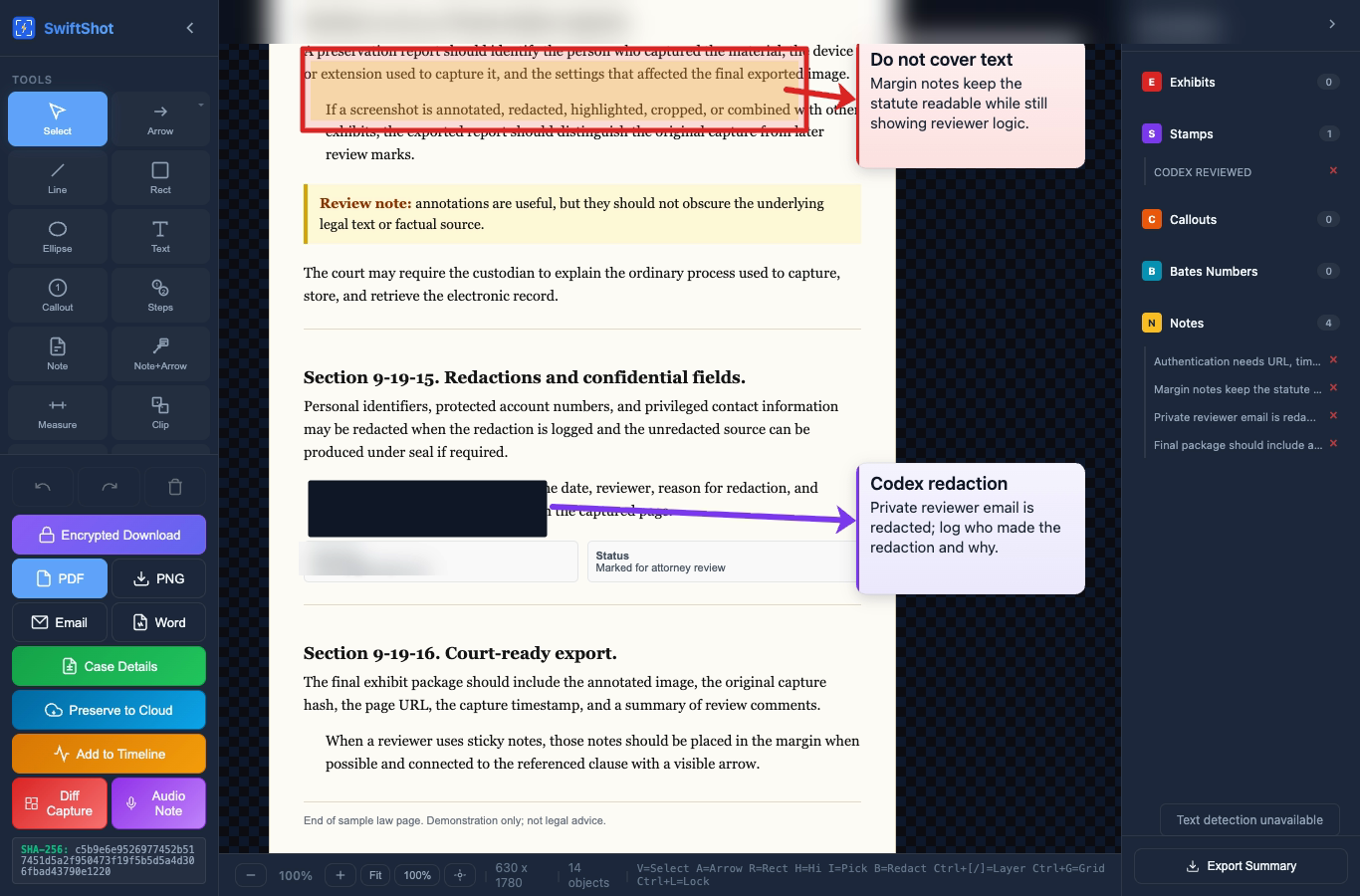
The SwiftShot editor showing a sample law page with highlights, margin notes, and a redaction
SHA-256
computing…
Hashing
Checked
just now
Live: your browser just hashed the exact image above.

35-second tour

See SwiftShot in action

Narrated walkthrough recorded from the real app.

The problem

One question sinks most screenshots.

A screenshot saved to a case folder looks like evidence. Then someone asks whether it could have changed since it was taken, and a plain image file has no way to answer.

  • No fingerprint. Nothing shows the pixels are the ones captured.
  • No neutral timestamp. File dates change with every copy.
  • No custody trail. No record of who touched it, or when.
IllustrationCross-examination
  1. Q. You took this screenshot yourself?
  2. A. Yes. Three months ago.
  3. Q. Can you prove this image hasn't been modified since capture?
  4. A. It's the file I saved.
  5. Q. That isn't what I asked.
Authenticity challenged

How it works

Four beats from screenshot to sealed evidence.

  1. 1 · Capture

    One click: visible area, a region, or the full page, with sticky headers handled.

  2. 2 · Fingerprint

    SHA-256 is computed the moment you capture. Change one pixel and it no longer matches.

  3. 3 · Annotate a copy

    Highlights, arrows, redactions, and Bates stamps land on a copy. The original and its hash stay untouched, and every edit is logged.

  4. 4 · Preserve & verify

    One click to WORM storage (Pro), or a PDF package with the hash, URL, timestamp, and custody log.

@harbor_rentalsMarch 14, 2026 · 9:41 PM

"We never received the tenant's notice. The deposit is forfeited."

SHA-256················································
  1. Captured
  2. Hashed
  3. Copy annotated
  4. Sealed

Tamper test

Change one character. Watch the proof break.

This is the check behind every SwiftShot capture. Edit the sample exhibit below: even a single space gives it a completely different fingerprint.

Exhibit 14 · sample textEditable
Hash at captureLocked
computing…
Hash right nowLive
computing…
Match: unalteredSame bytes as the moment of capture. Mismatch: this exhibit was changed0 of 64 hash characters moved.

Computed in your browser with the standard SHA-256 function. Nothing you type is sent anywhere.

The difference

A screenshot vs. an evidence record.

PNG
Screenshot 2026-03-14.pngRegular screenshot
  • No proof of capture time
  • No hash verification
  • Can be edited undetectably
  • No chain of custody
  • Sits on a local drive
  • Open to authenticity challenges
Exhibit 14 · SwiftShot captureEvidence record
  • SHA-256 hash at captureade7…f8eb
  • Cryptographic verificationmatch
  • Any edit breaks the hash
  • Full audit trail4 events
  • WORM cloud storage (Pro)
  • Built to answer the authenticity question

See the editor

Real recordings. Sample documents.

Each clip is recorded from the SwiftShot editor on demonstration material. No client or case data.

Legal review Highlights stay on the clause. Notes sit in the margin, with arrows back to the exact language.

Features

Everything you need. Nothing you don't.

Free

SHA-256 hash on every capture

Every capture is cryptographically fingerprinted at the moment of the click. Change one pixel and the fingerprint no longer matches.

ade7523c 75351bf5 40505047 5646da38 64c813b2 59296cff 2ea39216 948ff8eb
Free

Multi-mode capture

Visible area, region select, or full-page scroll, with automatic sticky-header handling so long pages stitch cleanly.

Free

Annotation tools

Arrows, rectangles, text, and highlights with full color control. All edits logged.

Standard

Forensic redaction

Black box, blur, or pixelate. Permanently destroys the pixel data underneath.

Standard

Legal stamps and Bates

Exhibit labels, CONFIDENTIAL, and auto-incrementing Bates numbers in one click.

Standard

OCR + speed reader

OCR a captured page and review dense legal text in a focused reader before marking the clauses that matter.

Pro

Cloud Vault (WORM)

Tamper-proof AWS storage with governance retention and per-case retention periods, plus a chain-of-custody log.

Claude Code + SwiftShot CLI

Let Claude read the evidence for you.

SwiftShot ships with a command-line tool. It pulls the text out of a capture with OCR and pipes it straight into Claude Code: parties, dates, risk flags, and deposition angles in seconds, not hours.

Contract review

Parties, dates, obligations, and unusual clauses, formatted for case notes.

Deposition prep

Ranked follow-up questions and contradictions with prior statements.

Timeline extraction

A dated event list with citations back to each exhibit.

Opposing filings

Weak arguments and unsupported assertions, with counterpoints.

# Capture a contract page and analyze it$ swiftshot-cli evidence extract exhibit_A.png --ocr --json \  | claude -p "You are a litigation paralegal. Identify all parties,
    key dates, obligations, and any clauses that could be
    challenged at trial." Claude:Parties: Harbor Point Lending LLC (Lender) · Anderson, James R. (Borrower)Execution date: March 4, 2021 (3 days before disclosure deadline)⚠ Section 4.2: ARM adjustment cap absent, potential TILA violation⚠ Section 7: arbitration clause uses "shall", may be mandatory in RIDepo angle: ask lender rep when Section 4.2 language was finalized

Works with Claude Code and any AI tool that accepts piped text. OCR runs on your machine; nothing leaves it unless you choose Cloud Vault.

Time savings

What manual capture really costs.

By hand, one capture means screenshot, save, rename, log it in a spreadsheet, email it, and check the URL. Set your own numbers.

3.8hours saved per case
$575saved per case

Estimate from your inputs. SwiftShot time is counted as 30 seconds per capture: click, annotate, preserve.

Pricing

Start free. Upgrade when you need more.

Free

$0
Forever
  • 10 captures per day
  • 3 PDF exports per day
  • SHA-256 hash on every capture
  • Basic annotation tools
  • PNG export
  • OCR and voice commands
  • Cloud preservation
Install free
Recommended

Standard

$29 /yr
Solo attorneys and paralegals
  • Unlimited captures
  • OCR text detection
  • Voice commands
  • Batch capture
  • Word export
  • Permanent redaction
  • Cloud preservation
Get Standard

Pro

$99 /yr
WORM storage + chain of custody
  • Everything in Standard
  • Evidence Timeline
  • Cloud Vault (WORM)
  • Chain of custody log
  • 25 GB included storage
  • 25 MB per-file upload
Get Pro

All plans process locally. Your data never touches our servers unless you opt into Cloud Vault.

Firm setup

Rolling SwiftShot out to a legal team?

AIBridges configures capture rules, custody workflows, training, and storage so SwiftShot fits how your team actually handles evidence.

  • Attorney and paralegal rollout
  • Evidence capture workflow setup
  • Training, checklist, and intake help
Evidence types to capture

Screenshots are easy. Evidence is hard.

Make every capture answer the authenticity question before anyone asks it. Installs in about ten seconds.